
Benchy
Cross-Platform System Benchmarking Tool
Benchy is a modern, cross-platform system benchmarking application written in Go with a polished Qt-based interface. It is designed to provide clear, repeatable insight into CPU, memory, disk, and overall system performance, presented in a clean, Geekbench-style results layout.
Unlike synthetic command-line benchmarks, Benchy focuses on visual clarity and usability, making it easy to understand performance characteristics at a glance while still offering detailed sub-scores for deeper analysis.
What Benchy Measures
Benchy evaluates multiple aspects of system performance through real, timed workloads:
- CPU performance
Single-core and multi-core benchmarks with independent scoring - Memory throughput
- Storage performance
- Image and compute-related workloads
Each category contributes to a clear, comparable scoring model.
Clear, Visual Results
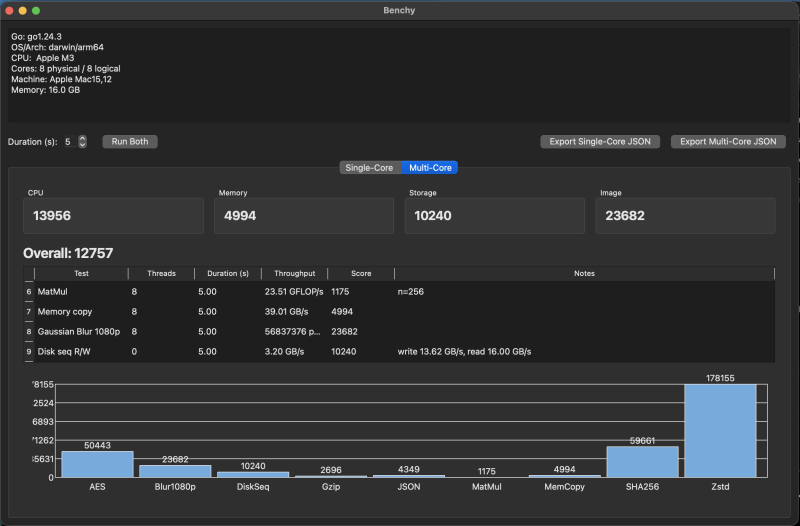
Benchmark results are presented in a dedicated results dialog, inspired by classic benchmarking tools:
- Single-Core and Multi-Core tabs
- Per-test sub-scores
- Large Overall score tile
(geometric mean, normalized to a baseline of 2500) - Simple, readable bar charts per category
- Section tiles for CPU, Memory, Storage, and Image workloads
The interface is designed to be informative without overwhelming the user.
Interactive & Exportable
- Mouse-hover tooltips on charts for precise values
- Axis labels and ticks for readability
- JSON export for each benchmark tab
(useful for comparisons, automation, or external analysis)
Native Desktop Experience
- Fully native application — no Electron, no web UI
- Automatic dark mode palette
- Fast startup and low overhead
- Identical experience across supported platforms
Philosophy
Benchy is built for users who want honest, understandable benchmarks rather than opaque numbers. It prioritizes:
- Transparency over gimmicks
- Native performance over web stacks
- Results you can interpret without guesswork
Current Status
Benchy is fully usable but currently in beta stage.
At the moment, binaries are available only for Windows x64.
The application is designed to work on macOS and Linux as well and requires only minor fixes to enable full support on those platforms.
Nightly builds can be downloaded from here.
Nightly builds may include experimental changes and are intended for testing and early access.